 Login
Login

Why can't I email my Word letters through EA today?
If you generate a Word letter in EA, you'll be used to pressing the Email button which creates a PDf file and emails it as an attachment.
We're sorry that this functionality isn't working today (Thu 18th Dec).
We've updated a mail server overnightwith a new version of the mail server software and it has broken the ability to send linked PDF files.
Unfortunately, we didn't spot the issue till this morning and we're mid way through the Weekly Email send out. If we stop the mail server and revert back to the old software (which will fix the problem straight away), your Weekly Emails won't go out and you'll have a more peaceful Christmas than you expected!
There are two ways to solve the problem:
1. Send the letters via Microsoft Word / Outlook (recommended)
2. Jot down the letters that you've created today and re-edit them tomorrow and do a re-send. (not recommended)
To send via Word / Outlook
These instructions relate to Word 2013 - older versions are slightly different.
Finish work on your document and save it
Choose File (top left in the Word menu). We'll mimic the way Expert Agent does it - by attaching a PDF which most recipients will be able to open and read. if you send a Word document, tablet and Mac users won't necessarily be able to open it.
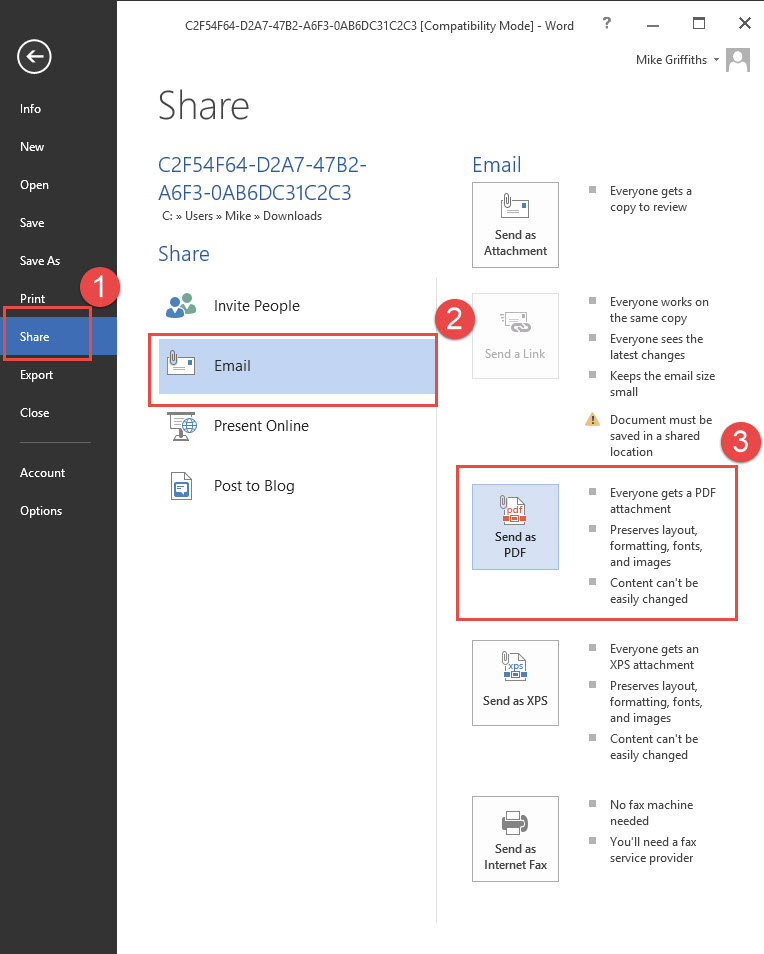
1. Choose Share
2. Choose Email
3. Choose Send as PDF
This will fire up an email in Outlook with the PDF as an attachment.
You'll need to paste in the email address from EA and paste in a standard note - something like
"please find attached a letter which we are posting to you tonight"
Some versions of Word and Outlook don't work well together. if that's the case, you'll have to do save as in your Word document and save it as a PDF. You'll then have to fire up your email system and attach the PDF
Sorry this is a nuisance. We'll solve the problem overnight.
Tel: 01225 303500 | Email: account.managers@webskyltd.com
Terms of Business | Cookie Policy | Privacy Policy | ZPG Modern Slavery Statement
Designed by the Expert Agent Design Department