 Login
Login



How can I list my property on Rightmove as a Premium property?
A premium flag is applied by Rightmove once the feed is processed – you will need to make contact with them directly to discuss this further.
The property put on the market last night is not displaying this morning?
We commence our portal uploads at 19:00 daily, this means that any data that is added or properties put on market after this time, WILL NOT BE ILLUSTRATED until the next feed has run and been processed by the portals the following evening.
We currently do not run the portal uploads on a Sunday evening, this is because so little is changed after Saturdays feed thus not needing to be refreshed on the portals.
We use this time to Run Re-indexing on our servers, which ensures that we are running at optimum speed for Monday Morning.
Do you have contact details for the portals?
We have listed contact numbers and email addresses for you under the Portal Contact Details section. Alternatively follow the steps outlined below:
- Tools
- Configuration
- Property Configuration
- Portal Contact Details
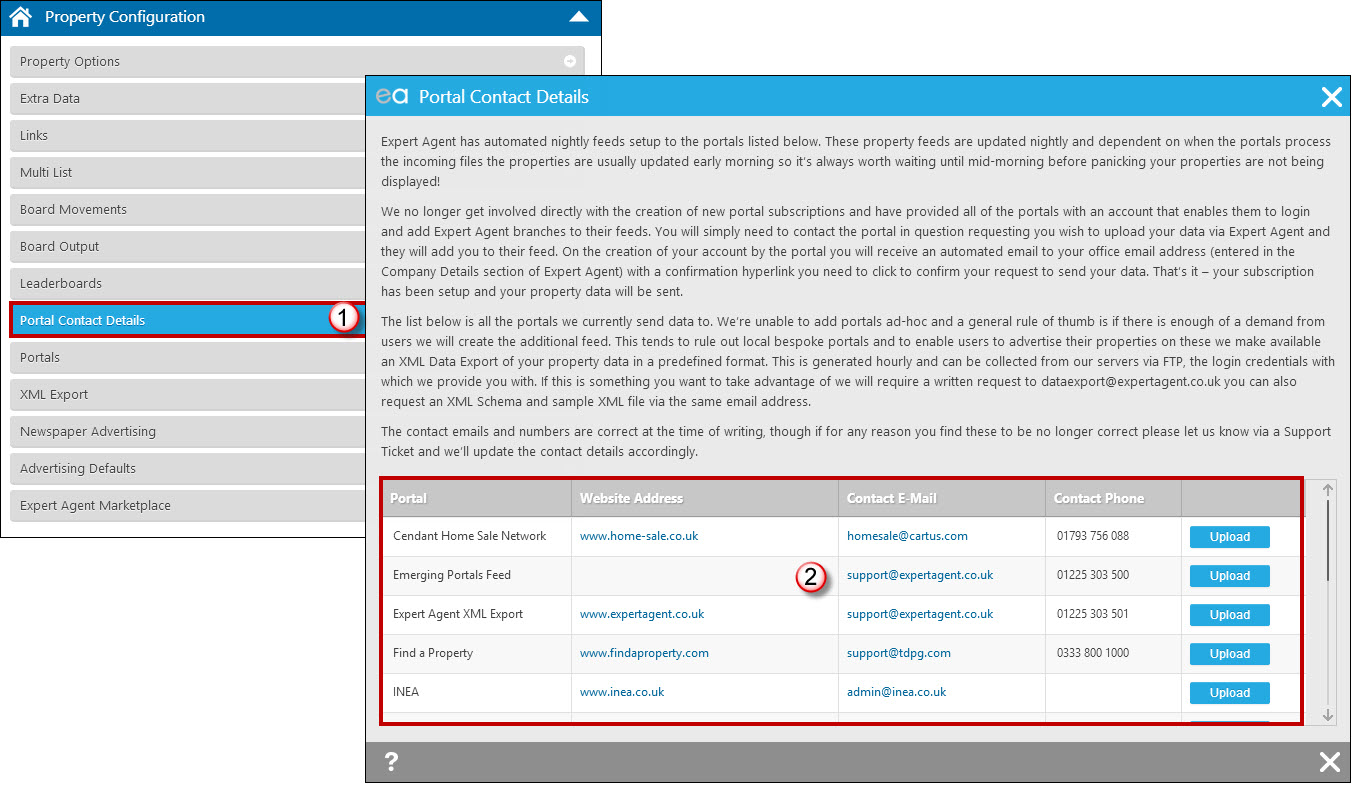
There is also the facility to “Request Upload” from this window. See the Portal Contact Details section for more information.
How do I set up a new portal feed?
To set up a new automatic portal feed from Expert agent, the first step is to contact the portal directly.
Once you have informed them that you wish to upload your data from EA, and set up or confirmed your original account, the portal in question will log into our system, using our portal subscription manager and set up your feed.
Once this has been completed, an automated Email will be dispatched to the main E-Mail address you have entered into your company information. It will include a hyperlink which, once clicked on, will enable the feed for you.
In a small number of cases this Email can find its way into your spam folder, so If you are experiencing any issues with the feed becoming live then please log a support ticket in the normal way (Help-> Get support), outlining your issues, and we will do our best to assist you.
Tel: 01225 303500 | Email: account.managers@webskyltd.com
Terms of Business | Cookie Policy | Privacy Policy | ZPG Modern Slavery Statement
Designed by the Expert Agent Design Department