 Login
Login



Exporting Payments to Banks
You are able to export your landlord and contractor payments into a compatible format for Bankline (used by the RBS group), Barclays (format also used by Metro Bank), Lloyds Corporate or HSBC through Expert Agent. This function allows for you to upload a CSV or text document (depending on the requirements of your bank) onto your online banking and make the payments in bulk rather than manually paying one at a time. This is accessed via your Payments to Make report.
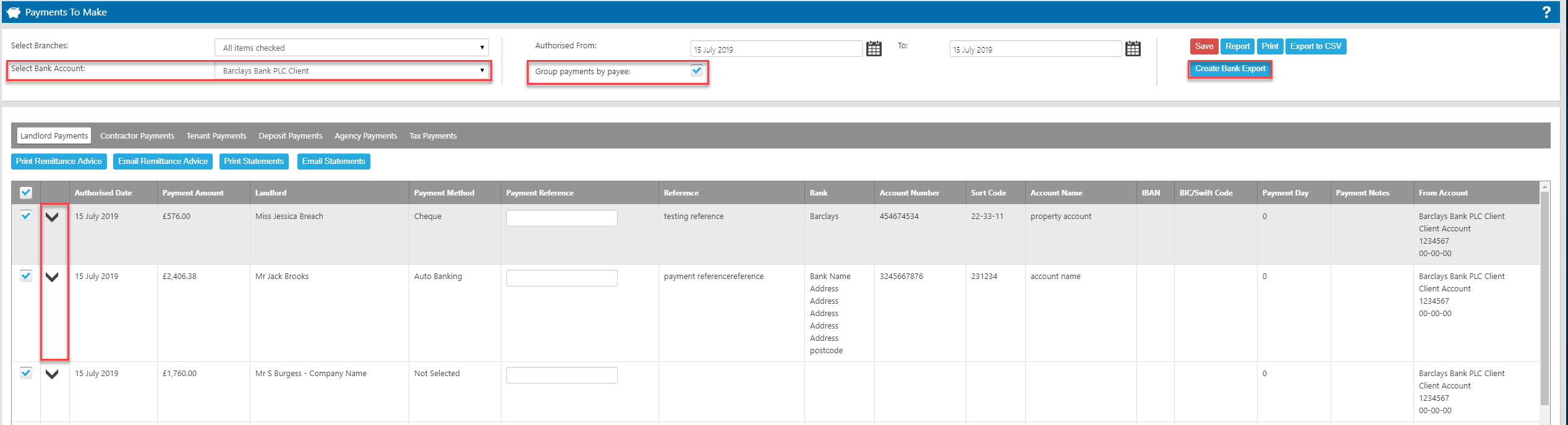
To ensure that this function works correctly, please carry out the following instructions to set up your Expert Agent to support the bank export functions;
From the Tools tab, open Configuration – lettings configuration – bank accounts:
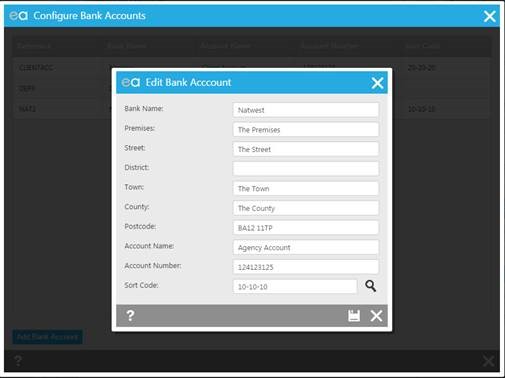
Please ensure that your client account details are filled in. Save and close.
Open the landlord’s record – financial details tab:
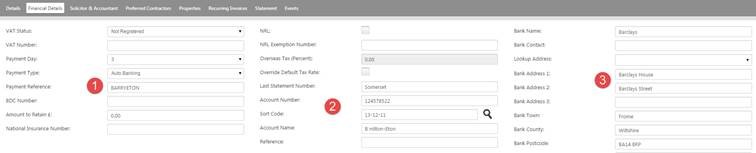
1. Enter a payment reference into the field provided
2. Enter the landlord’s banking account number, sort code and account name
3. Enter the landlord’s bank account address
Click Save.
Open the contractor’s record – details tab;
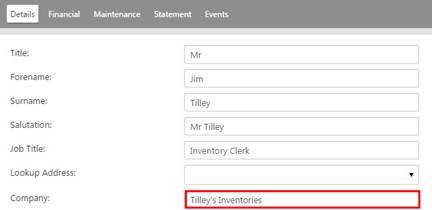
Please ensure that the company name is entered into the field provided
Click onto the Financial tab

1. Enter the contractor’s account number, sort code and account name
2. Enter the contractor’s bank address
HOW IT WORKS
Open the Finance tab – payments;
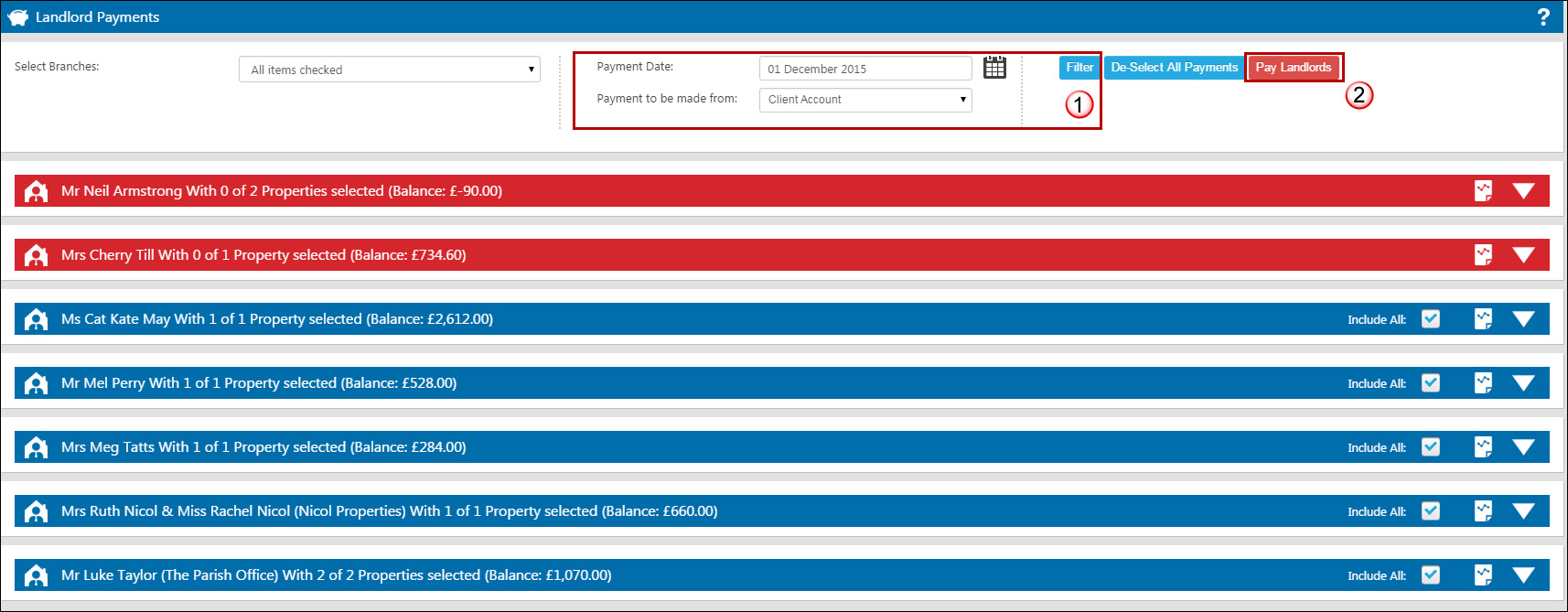
- Before making the landlord payment, you may wish to forward date the payment date at the top, by approximately 3 days as you may be charged for instant payments
- Pay your selected landlords or contractors
From the Payments Made record;
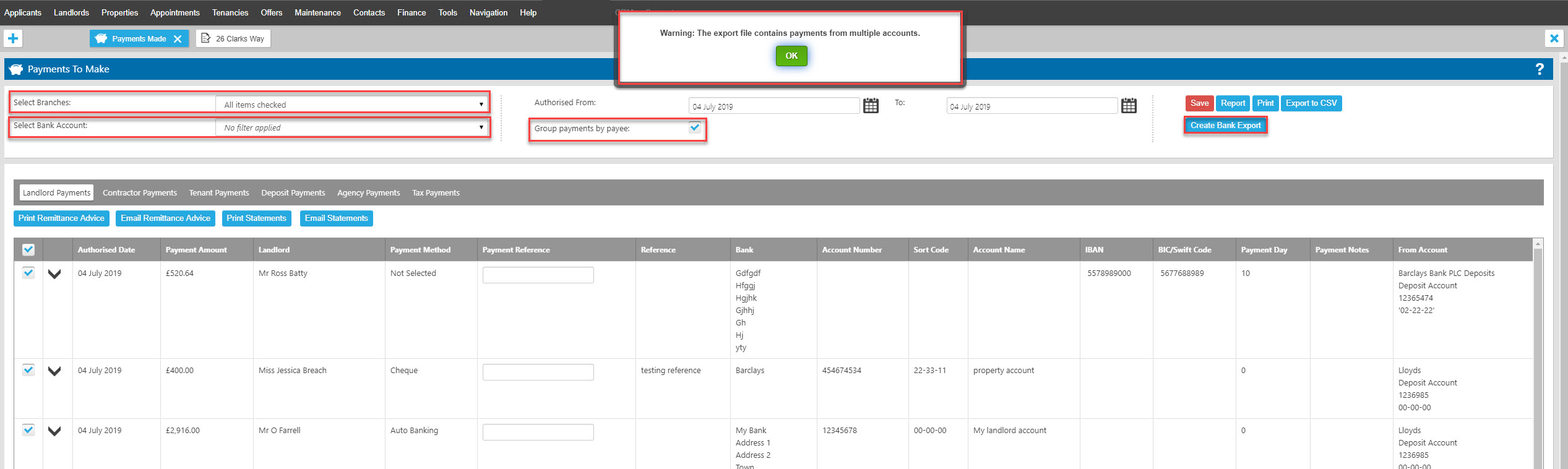
1. Chose to group payments by payee if you wish to only process one payment per landlord rather than a separate payment for each of your landlord's properties
2. The bank account you have made payments from will be selected by default, use the drop down to include payments from other accounts if required.
3. Click on the “Create Bank Export" button. If you have payments made from multiple bank accounts loaded, you will be presented with an alert to warn you of this, in case your bank requires you to run separate exports per account.
4. The following window will open:
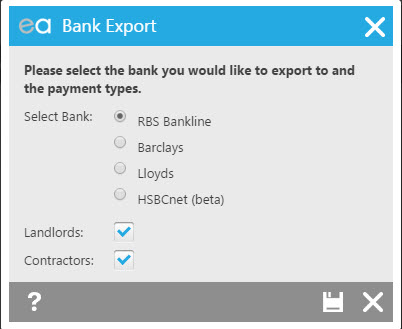
At this point you need to select the bank which you use and also whether you wish both Landlord and Contractor payments to show or just one of them. When you press save, the download will begin and show in the bottom left corner of your browser window:
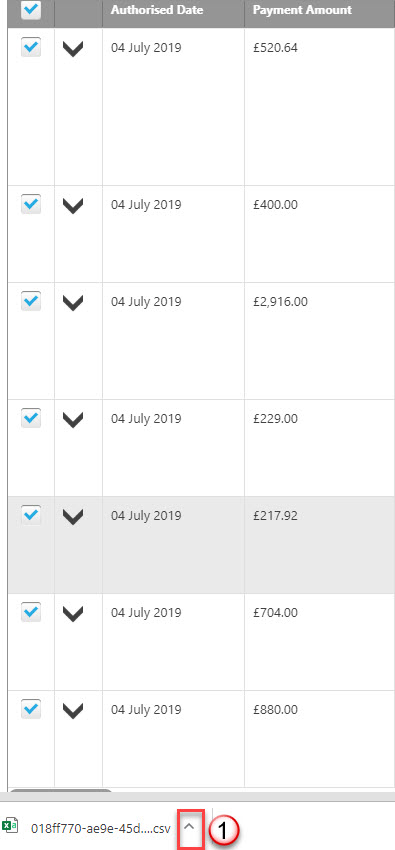
1. A pop up will appear in the bottom left corner of your screen of your file for you to open and use.
You May also find this FAQ helpful if you find that your version of Excel is removing the first digit from any account numbers or sort codes beginning with zero.
IF YOU USE BANKLINE OR BARCLAYS - DO NOT click on the pop up to up to open it, rather click on the little downwards facing arrow on the right of the pop up and select “show in folder”.
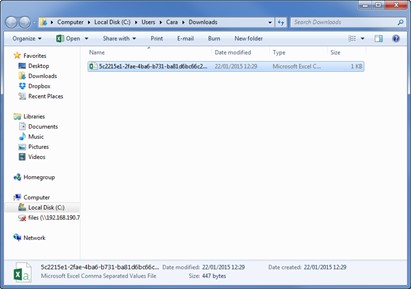
* If you right click on the file appearing in your downloads, click on “open with” and select to open it with a text document only as it will not work correctly in CSV format.
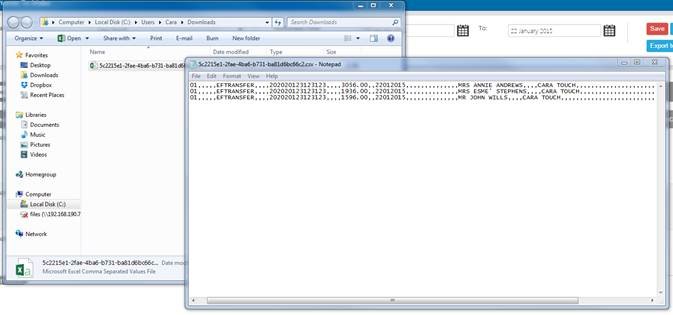
* You can now click on File – Save as – save it to your desktop as a text doc.
Log into your Bank account and upload your text document that you have saved to your desktop.
Saved Selections (Custom Quicklinks)
Saved Selections is a fantastic feature which extends the efficiency of Quicklinks even further by allowing you to create your own Custom Quicklinks.
Saved Selections give you freedom to build and create your own links to suit your day to day role, allowing you to access your word load quickly and easily. These are used in conjunction with the standard Quicklinks we provide.
It is very simple to create your own Saved Selections starting from any grid in Expert Agent. In order to achieve this you need to place filters on the relevant grid to display the records you wish to work with.
In this example we are going create a Saved Selection showing what offers are due to complete in the next month.
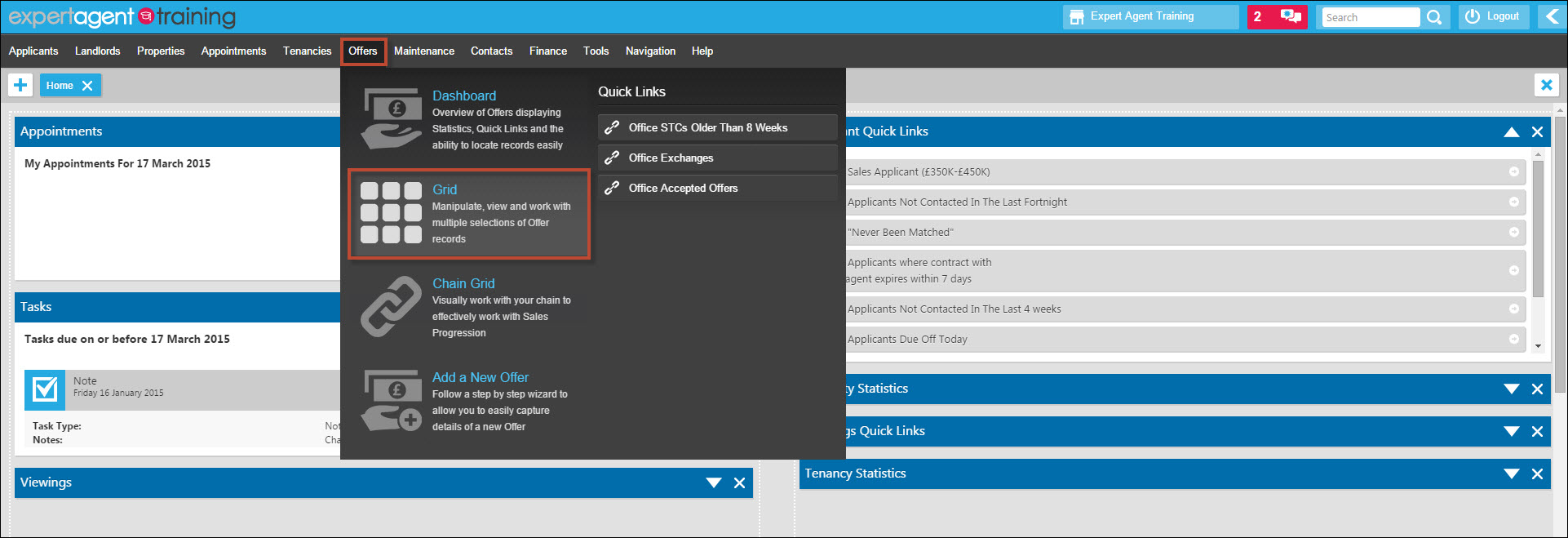
Hover over 'Offers' in the EA Top Menu and select the 'Grid' option. This action will open the Offers Grid.
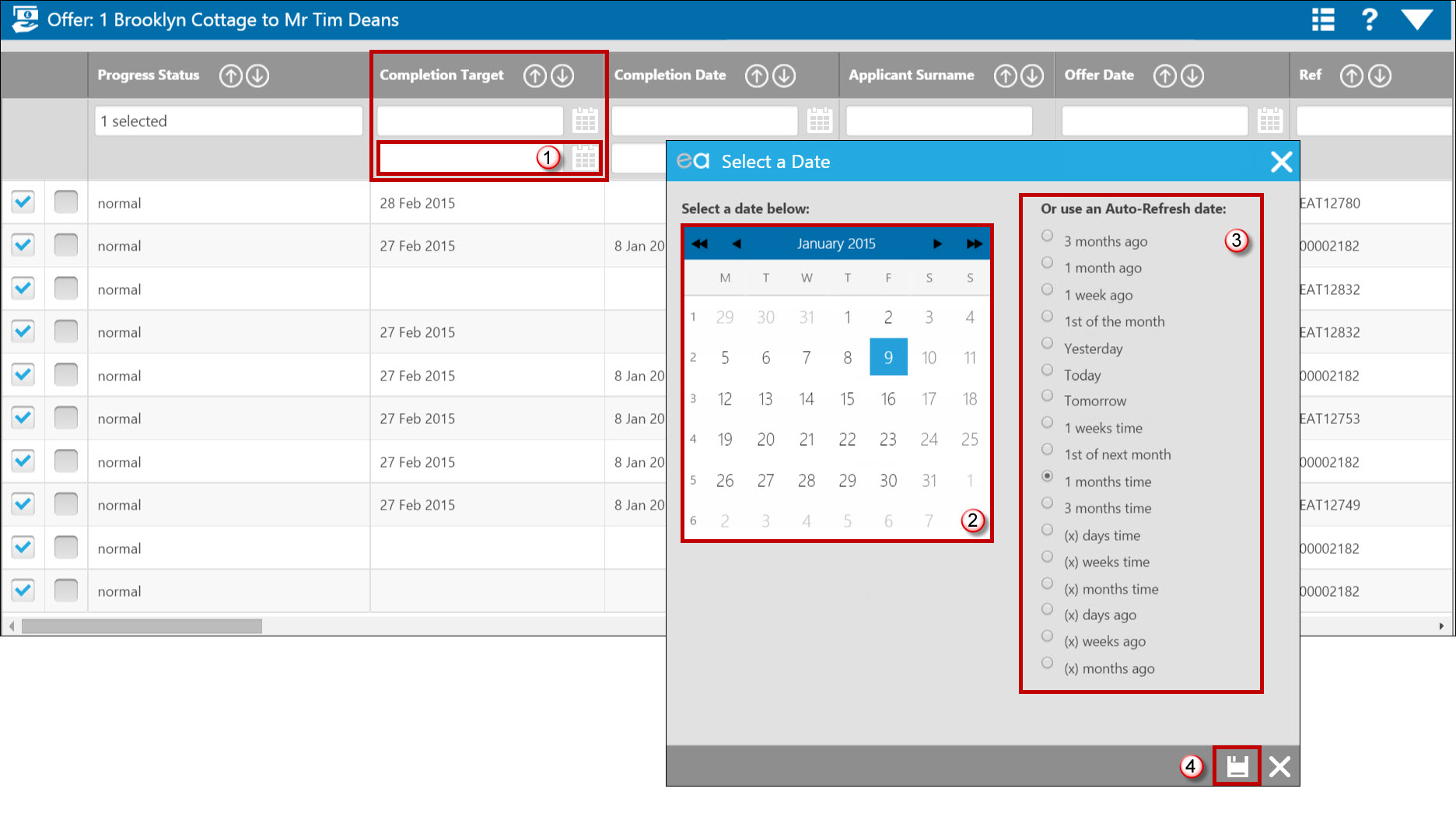
- Start placing the relevant filters in the grid. This example is a simple one filter selection however you can place as many filters on the grid as needed to obtain the correct selection. Using 'Date' filters will open the 'Select a Date' popup.
- Use the calendar option if you wish to select set dates for the selection.
- Alternatively, use the 'Auto-Refresh' date option to keep your selection dynamic. in this example we are using the '1 Months Time' option.
- Remember to Save!
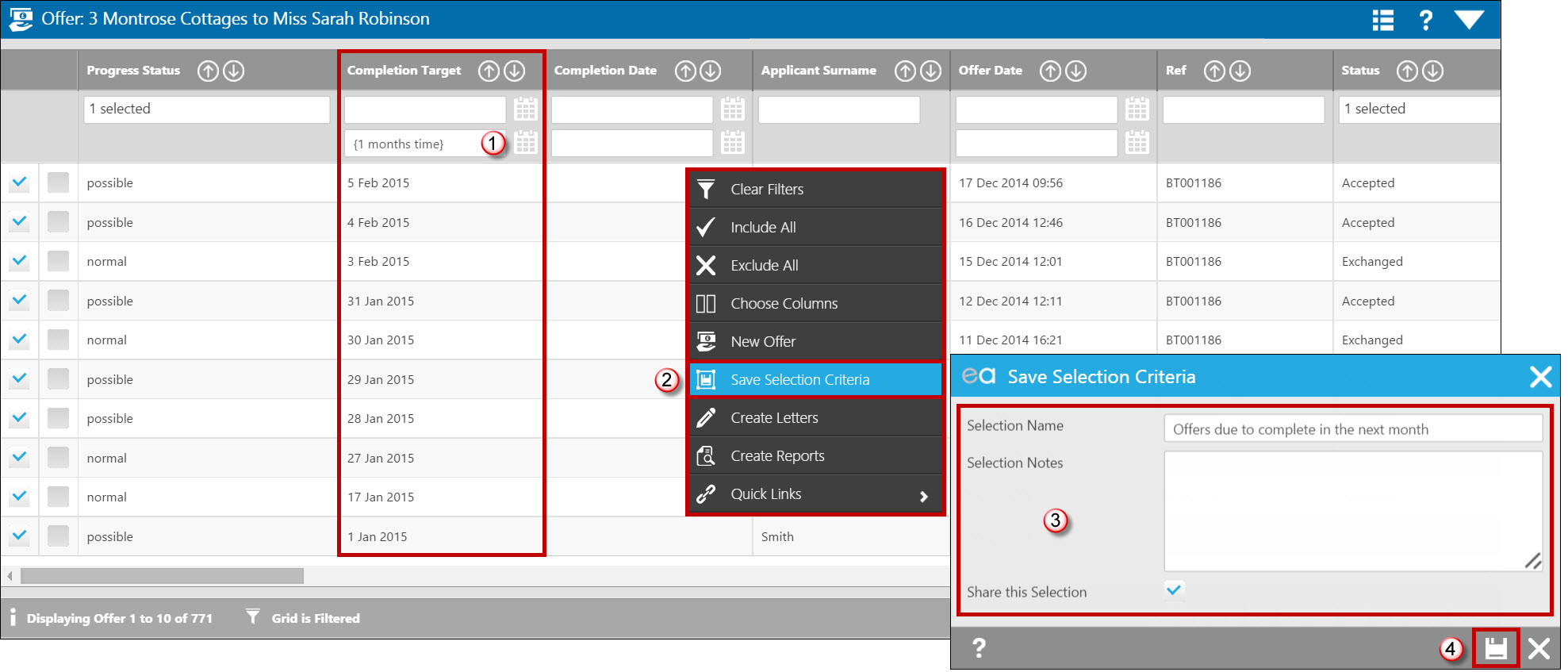
- The filter has now been applied to the grid.
- In order to save the selection, right click and select the 'Save Selection Criteria' option.
- Give your selection a name, add any notes if needed and tick the 'share' option if you would like your new Saved Selection available for everyone else in the office.
- Remember to Save!
In order to find your new Saved Selection, go to either the Offers Dashboard or Right Toolbar and select the edit/cog icon.
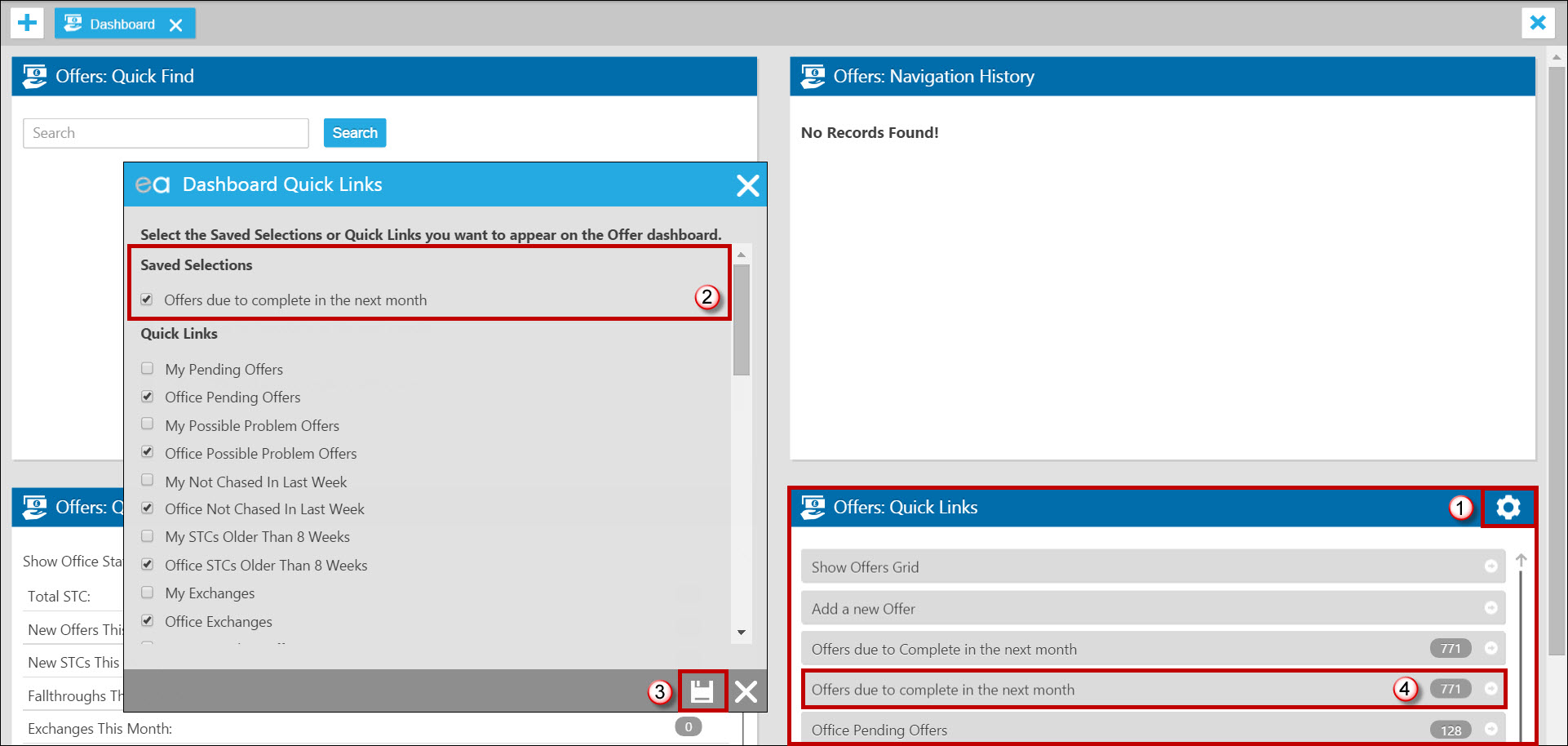
- Click on the cog or edit icon to open your list of available Quicklinks and Saved Selections.
- Tick your new Saved Selection.
- Save your changes.
- Your new Saved Selection will display in your list of Quicklinks.
If you would like to view the full list of Saved Selections setup in the office, delete any no longer in use or share your personal Saved Selections simply follow the steps below:
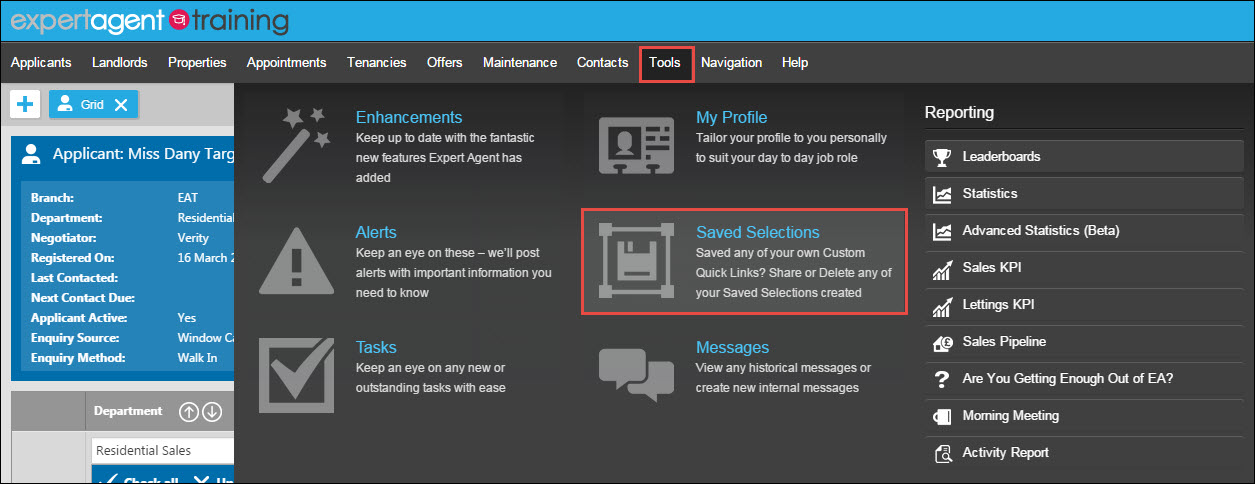
Hover over Tools in the EA Top Menu and select the Saved Selections option.
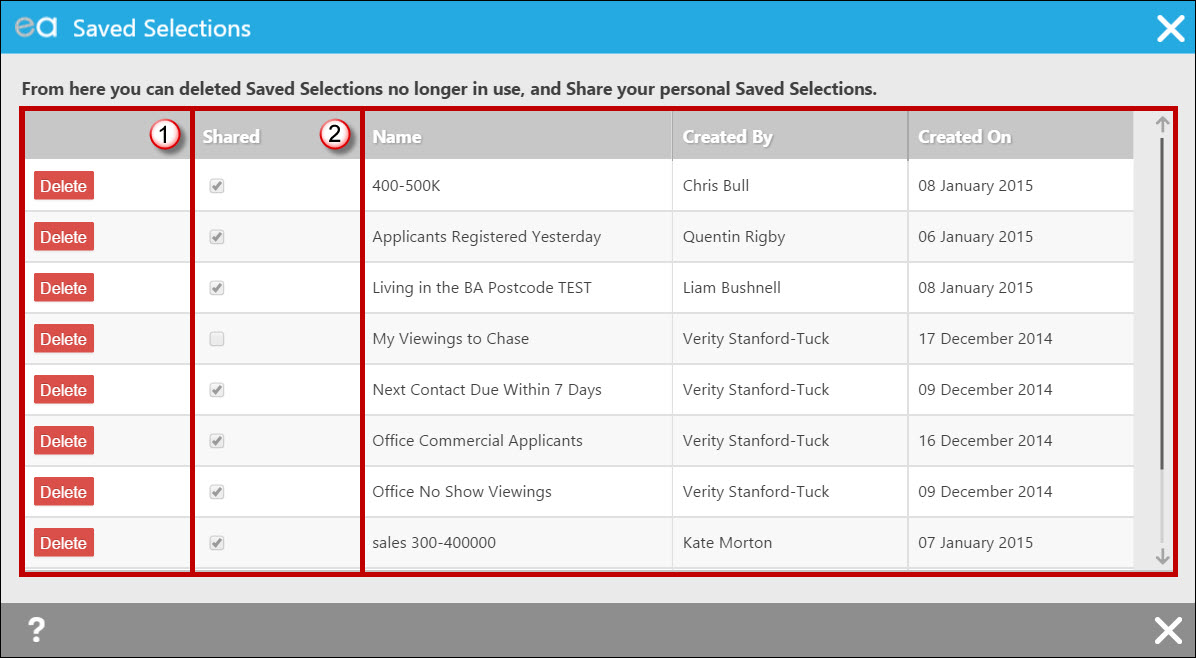
- Delete any Saved Selections no longer in use
- Share any of your personal Saved Selections with the rest of the office.
Quicklinks on your Right Toolbar
We have already learnt that Quicklinks are a very valuable tool available to you, allowing you to see at a glance what work is outstanding and prioritise work load.
Alongside the Dashboard and Homepage options to work with Quicklinks, you have the ability to set up your Right Toolbar.
The main benefits of the Right Toolbar include:
- Ability to view all suitable quicklinks including Applicant, Property, Viewing, Offer, Landlord, Tenancy, Maintenance and Finance links.
- The Right Toolbar can be extended with the click of a button anywhere in the system.
- The ability to choose only the very important links that need to be monitored regularly.
You can use the Apply Standard Settings button in your Staff Profile to give you a list of useful Quicklinks to start from in your Right Toolbar. Please see Apply Standard Settings on Grids and Quick Links for more information.
If you wish to manually add the Quicklinks you prefer then please follow the steps below.
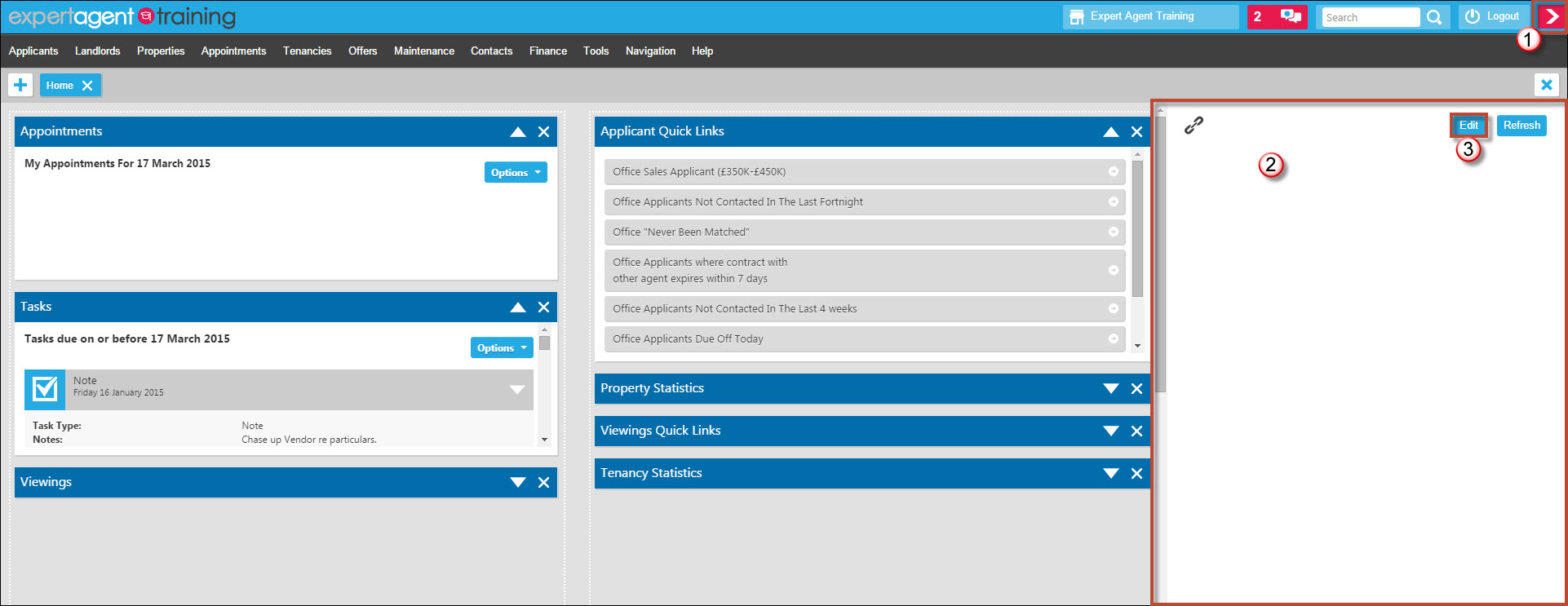
- Click on the arrow button displaying in the top right hand corner to extend the Right Toolbar - the arrow will turn pink when you hover over it.
- You will notice the Right Toolbar is blank - you will need to choose which links you would like to display.
- Click the 'Edit' option to open the list of available Quicklinks.
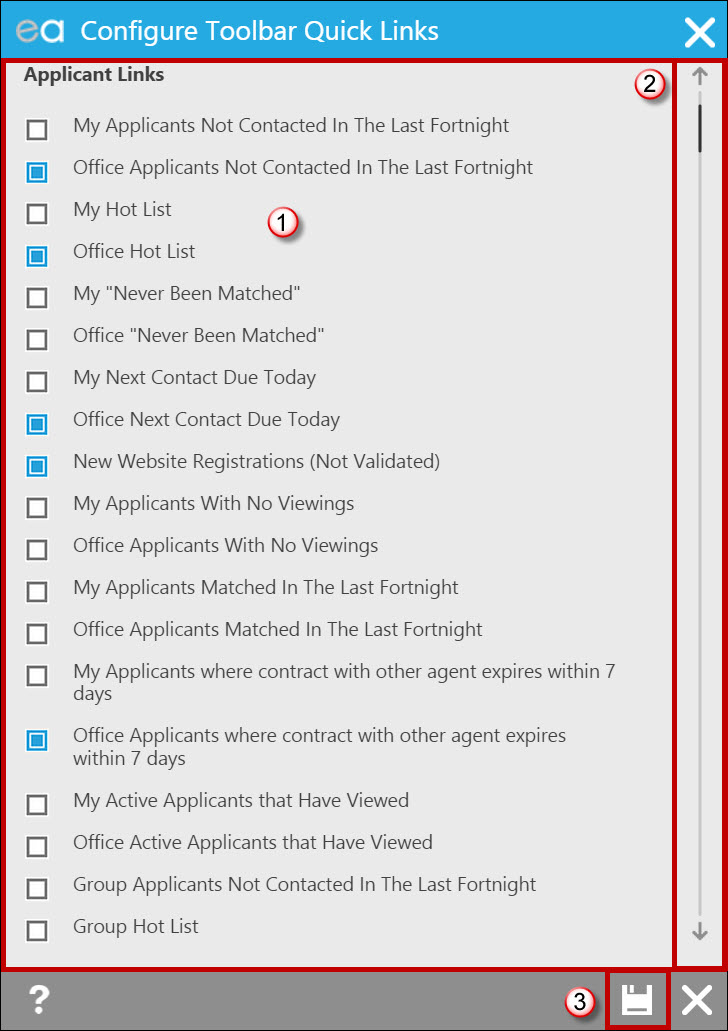
- Tick the boxes of the links you wish to display in your Right Toolbar.
- Note the large scroll bar to scroll down to further Quicklinks available.
- Once you have made your relevant selections remember to save!
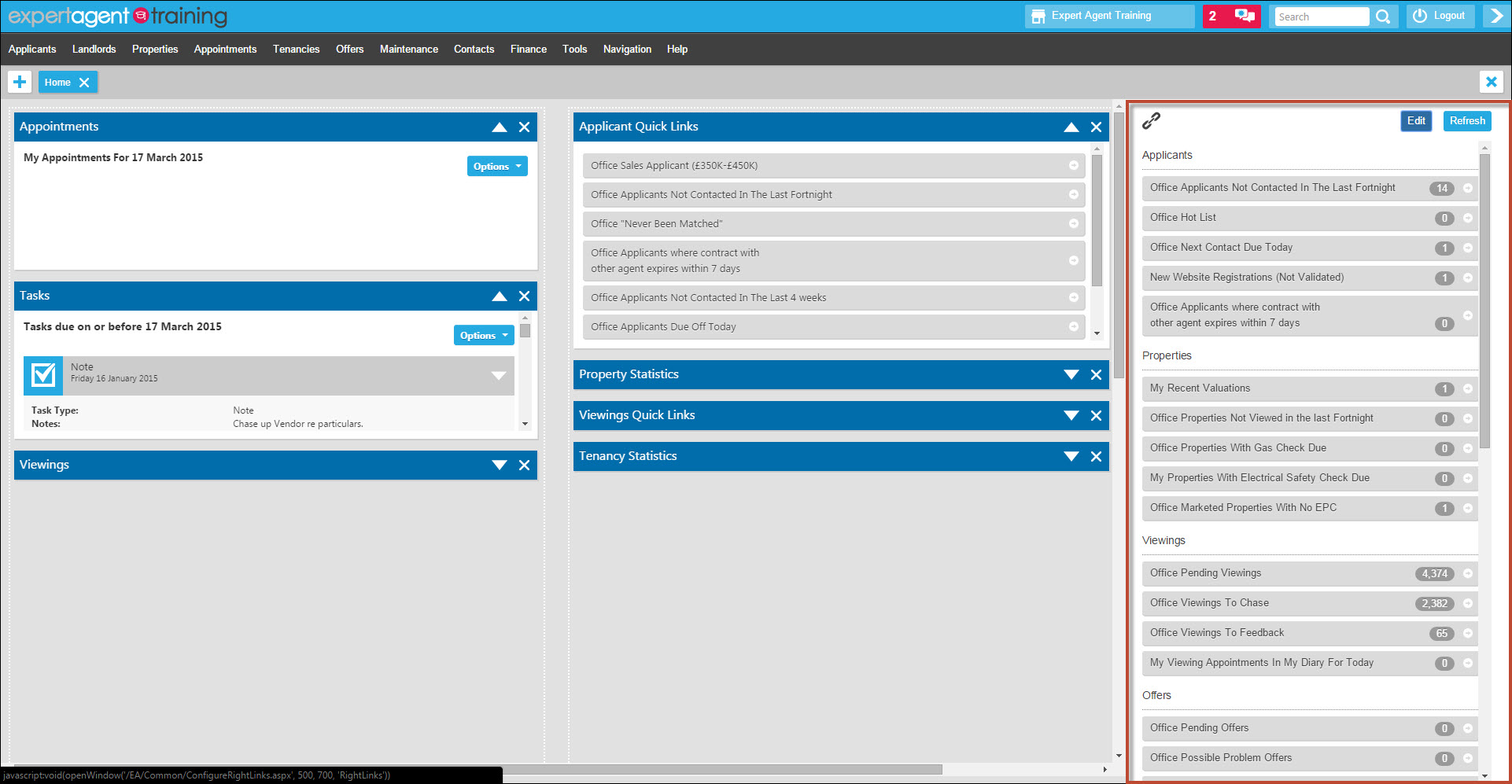
The selected Quicklinks will now display in your Right Toolbar.
Why can't I email my Word letters through EA today?
If you generate a Word letter in EA, you'll be used to pressing the Email button which creates a PDf file and emails it as an attachment.
We're sorry that this functionality isn't working today (Thu 18th Dec).
We've updated a mail server overnightwith a new version of the mail server software and it has broken the ability to send linked PDF files.
Unfortunately, we didn't spot the issue till this morning and we're mid way through the Weekly Email send out. If we stop the mail server and revert back to the old software (which will fix the problem straight away), your Weekly Emails won't go out and you'll have a more peaceful Christmas than you expected!
There are two ways to solve the problem:
1. Send the letters via Microsoft Word / Outlook (recommended)
2. Jot down the letters that you've created today and re-edit them tomorrow and do a re-send. (not recommended)
To send via Word / Outlook
These instructions relate to Word 2013 - older versions are slightly different.
Finish work on your document and save it
Choose File (top left in the Word menu). We'll mimic the way Expert Agent does it - by attaching a PDF which most recipients will be able to open and read. if you send a Word document, tablet and Mac users won't necessarily be able to open it.
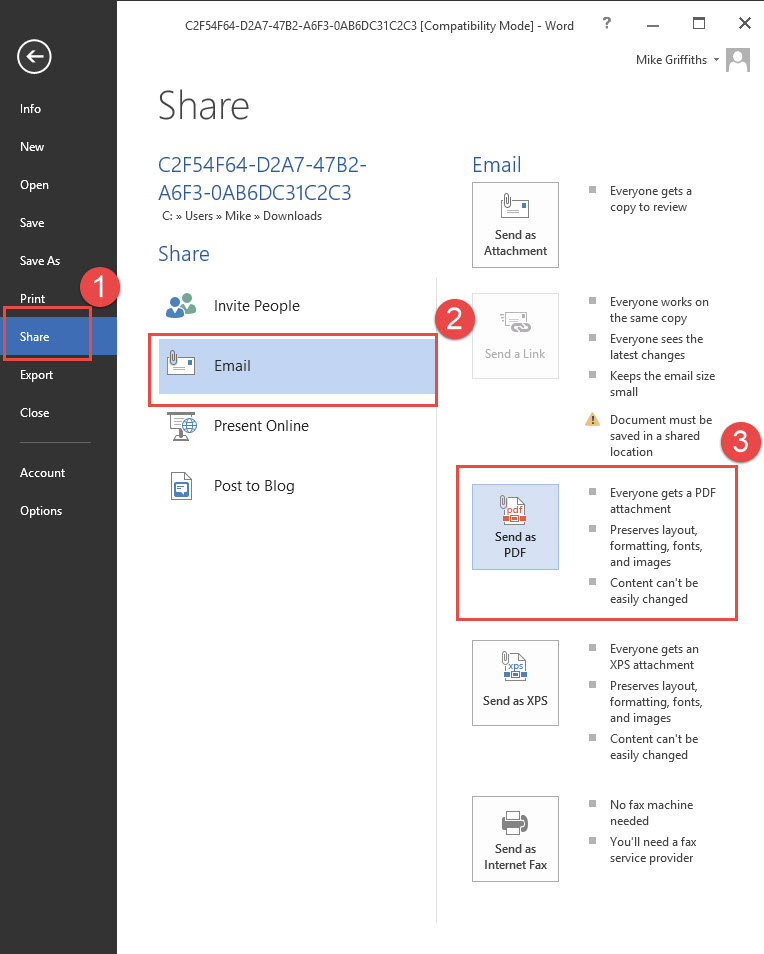
1. Choose Share
2. Choose Email
3. Choose Send as PDF
This will fire up an email in Outlook with the PDF as an attachment.
You'll need to paste in the email address from EA and paste in a standard note - something like
"please find attached a letter which we are posting to you tonight"
Some versions of Word and Outlook don't work well together. if that's the case, you'll have to do save as in your Word document and save it as a PDF. You'll then have to fire up your email system and attach the PDF
Sorry this is a nuisance. We'll solve the problem overnight.
Tel: 01225 303500 | Email: account.managers@webskyltd.com
Terms of Business | Cookie Policy | Privacy Policy | ZPG Modern Slavery Statement
Designed by the Expert Agent Design Department